
PlaceCommand is a product of Redfish Labs LLC.
PlaceCommand Alerts
Last updated October 8, 2026
PlaceCommand Alerts go only to staff users of a PlaceCommand customer. A text arrives when a guest message needs a reply, and it includes the guest's message and a suggested reply. The staff user replies Y to approve, N to skip, or types their own reply. Guests never receive these texts. Redfish Labs LLC operates the program. Consent is not a condition of using PlaceCommand.
How to opt in
- Open Settings, then My account.
- Find Text alerts.
- Enter your mobile number.
- Choose Send code, then enter the 6-digit code.
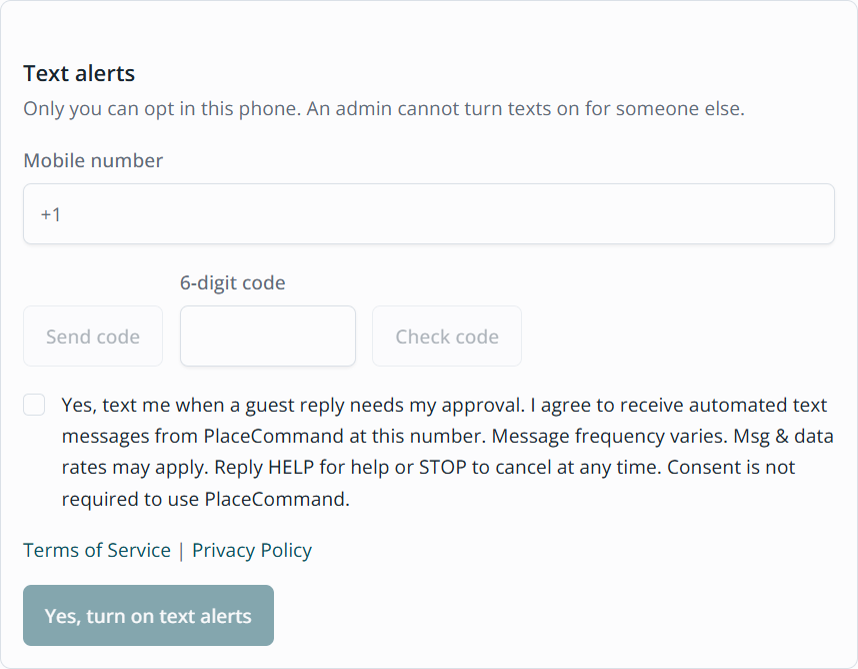
- Check the consent box. It starts unchecked.
- Choose Yes, turn on text alerts.
Consent checkbox
The checkbox is unchecked until the person checks it. The wording is:
Yes, text me when a guest reply needs my approval. I agree to receive automated text messages from PlaceCommand at this number. Message frequency varies. Msg & data rates may apply. Reply HELP for help or STOP to cancel at any time. Consent is not required to use PlaceCommand.
Under the checkbox: Terms of Service and Privacy Policy.
Sample message
PlaceCommand: [property_name] - [guest_first_name] ([stay_dates])
asked: "[guest_message]" Checked: [evidence_lines]. Draft reply:
"[draft_reply]" Reply Y to send, N to skip, or type your own reply.
Reply STOP to opt out.
Opt-in card
Frequency, help, and opt-out
Message frequency varies by activity.
Message and data rates may apply.
Reply HELP for help. Reply STOP to opt out. Reply START to opt back in.
Carriers are not liable for delayed or undelivered messages.
Support: support@placecommand.com